Security status update for Layershift customers
Last updated: 27 October 2026, 19:22
What happened?
On 21 October, the PHP development team released emergency fixes for two critical vulnerabilities (php2shell), CVE-2026-109618 and CVE-2026-109619, both rated 9.2 out of 10.
These vulnerabilities could allow attackers to execute malicious code on affected servers without logging in. PHP powers WordPress, WooCommerce and many other websites and applications.
The fixed upstream versions are PHP 8.2.35, 8.3.36, 8.4.27 and 8.5.12.
On Fully Managed VPS, your server may show a lower version number and still be patched. If your website uses CloudLinux HardenedPHP (shown in Plesk as alt-php, for example alt-php84, or marked (Secured)), CloudLinux adds the security fix to the version you already have instead of changing the version number. So your website can show PHP 8.4.26 and still be fully protected.
CloudLinux has since released packages with numbers that match the versions above. They contain exactly the same fixes, so we don't currently plan to switch to them: it would cause disruption to your server for no security benefit.
The thing to check is the Build Date, not the version number.
How to check your PHP is patched on Fully Managed VPS
- In Plesk, go to Websites & Domains and open PHP Settings for your website.
- Click View the phpinfo() page, next to the PHP version.
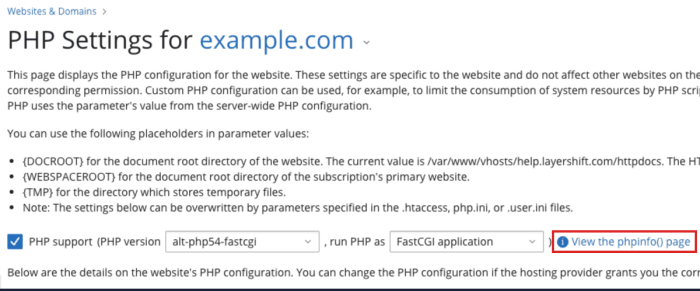
- Near the top of the page that opens, find Build Date.
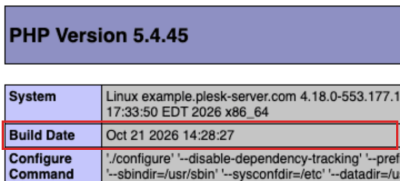
If the Build Date is 21 October 2026 or later, that PHP version is patched against CVE-2026-109618 and CVE-2026-109619.
If your websites use different PHP versions, check one website for each version. If the Build Date is earlier than 21 October 2026, or you're not sure, contact Support and we'll check for you.
See the official PHP security advisory for technical details and the latest guidance.
Current status: What does this mean for you?
| Service | What we've done | What you need to do |
|---|---|---|
| Fully Managed VPS | Completed initial Plesk PHP patching on 21 October. Completed HardenedPHP updates on 23 October. | No action needed. Sites automatically use the patched PHP versions. |
| Enscale PaaS | Applied temporary PHP mitigations and published patched PHP runtime templates and database-node templates (for phpMyAdmin/phpPgAdmin). | Identify affected nodes and apply the relevant updates. |
Important for Enscale customers: Published templates do not automatically update existing environments.
You must redeploy affected nodes to use the updated version.
What do you need to do?
Fully Managed VPS
We're applying PHP security updates directly to customer servers; you don't need to initiate the updates yourself.
There are two separate sets of updates:
- Plesk PHP: Security updates for PHP 8.2 and later, with deployment starting on 21 October. This has now been completed.
- CloudLinux HardenedPHP (alt-php): Updates for older PHP versions covered by extended lifecycle support, with deployment starting on 22 October. This has now been completed.
Updates are installed server by server. PHP handlers restart briefly during installation, and server load may temporarily increase. No other observable service disruption is expected, although unexpected issues are possible.
We'll notify you through your individual helpdesk ticket when each set of updates has completed. You may receive separate confirmations for Plesk PHP and HardenedPHP.
If you experience any problems following an update, please contact Support.
Enscale PaaS
The action required depends on the types of nodes in your environment.
If you're running a PHP application
Check that your application is compatible with a currently supported PHP version, preferably PHP 8.3 or later.
PHP 8.2 reaches end of upstream support on 31 December 2026.
Patched templates are now available for all PHP node types.
Redeploy to the tag that matches your PHP version:
Apache PHP
apachephp:2.4.69-php-8.2.35-almalinux-9apachephp:2.4.69-php-8.3.36-almalinux-9apachephp:2.4.69-php-8.4.27-almalinux-9apachephp:2.4.69-php-8.5.12-almalinux-9
LEMP
lemp:1.30.6-php-8.2.35-almalinux-9lemp:1.30.6-php-8.3.36-almalinux-9lemp:1.30.6-php-8.4.27-almalinux-9lemp:1.30.6-php-8.5.12-almalinux-9
Nginx PHP
nginxphp:1.30.6-php-8.2.35-almalinux-9nginxphp:1.30.6-php-8.3.36-almalinux-9nginxphp:1.30.6-php-8.4.27-almalinux-9nginxphp:1.30.6-php-8.5.12-almalinux-9
LiteSpeed PHP
litespeed:6.3.7-php-8.2.35-almalinux-9litespeed:6.3.7-php-8.3.36-almalinux-9litespeed:6.3.7-php-8.4.27-almalinux-9litespeed:6.3.7-php-8.5.12-almalinux-9
LLSMP
llsmp:6.3.7-php-8.2.35-almalinux-9llsmp:6.3.7-php-8.3.36-almalinux-9llsmp:6.3.7-php-8.4.27-almalinux-9llsmp:6.3.7-php-8.5.12-almalinux-9
Tip: Clone your environment if you need to test PHP version compatibility before proceeding. Rollback to EOL PHP versions is not supported.
Contact support if your application does not support PHP 8.2+. There are reports of successful exploits in the wild.
We can provide alternative secure options for your application if you cannot update immediately.
Before you redeploy:
- Review Virtuozzo's Container Redeploy instructions before starting.
- Read Redeploy Preserved Data to understand how to retain application files, volumes and configuration.
- Check which custom files and directories need preserving. Data not retained during redeployment may be lost.
- Allow for compatibility testing and any necessary maintenance.
Important: Redeployment replaces the container filesystem. Make sure your application data and configuration are preserved before proceeding: our defaults should retain everything typically needed, but it's worth double-checking!
If you're using a database node
Database nodes contain PHP through administration tools such as phpMyAdmin or phpPgAdmin, even when your application doesn't use PHP.
Restrict access to these administration interfaces by disabling access through the Shared Load Balancer (SLB), the Disable Webserver on SQL nodes add-on, or by (apache) web server configuration within the database server node.
With access restrictions in place, no further database-node action is required for this particular incident. EOL database software should still be scheduled for upgrade.
Patched templates are now available for all database node types.
Redeploy to the tag that matches your database server version:
MariaDB
mariadb:10.6.28-almalinux-9mariadb:10.11.19-almalinux-9mariadb:11.4.13-almalinux-9mariadb:11.8.9-almalinux-9mariadb:12.3.3-almalinux-9
MySQL
mysql:8.4.13-almalinux-9mysql:9.7.4-almalinux-9
Percona
percona:8.4.10-almalinux-9percona:9.7.1-almalinux-9
PostgreSQL
postgres:14.24-almalinux-9postgres:15.19-almalinux-9postgres:16.15-almalinux-9postgres:17.11-almalinux-9postgres:18.6-almalinux-9
Important: Review database server release notes for additional steps and considerations if your redeployment involves a major version upgrade.
(e.g. MySQL does not permit to skip over an LTS series: for example you cannot upgrade MySQL/Percona from 5.7 to 8.4 without first upgrading to 8.0, which is EOL since April 2025).
Important: Redeployment replaces the container filesystem. Make sure your data and configuration are preserved before proceeding: our defaults should retain everything typically needed, but it's worth double-checking!
Tip: Clone your environment if you need to test compatibility before proceeding. Rollback to previous database server versions is not supported.
Tip: Consider deploying an additional database node (within the current environment, or a separate one) and performing a database dump and import (see SSH between Enscale nodes as an alternative. This approach gives you more control over the process and the ability to rollback (i.e. just re-point your application to the other database node). This is the required approach to upgrade from MySQL 5.7
Which nodes are not affected?
Apache and Nginx deployed as load balancers, and application nodes using runtimes other than PHP, aren't affected by these PHP vulnerabilities.
What we've done so far
Fully Managed VPS
21 October
- Applied a temporary PHP configuration mitigation to reduce exposure while patches became available.
- Began deploying Plesk PHP security updates to customer servers.
- Sent advance notifications and individual completion confirmations.
- Imunify360 released additional WAF rules for servers running Imunify360, providing another layer of protection while patching progressed.
22 October
- Began testing and deploying CloudLinux HardenedPHP updates for older PHP versions.
- Tested updates on selected customer servers before expanding the rollout.
- Continued installation across affected servers, including customer-specific completion notifications.
The HardenedPHP rollout is more time-consuming because of the number of PHP versions and packages involved.
23 October
- Completed HardenedPHP updates rollout.
Enscale PaaS
21 October
- Applied
session.upload_progress.enabled=0across PHP nodes as a partial mitigation for CVE-2026-109619. - Made updated Apache PHP, Nginx PHP and LEMP templates available.
- Notified customers about the vulnerabilities and required action.
- BitNinja released WAF rules targeting the php2shell vulnerabilities.
22 October
- Identified that the initial configuration change hadn't taken effect on LiteSpeed nodes because the expected service restart had not completed.
- Forced a restart of all LiteSpeed services at 08:46 UTC to apply the change.
- Continued work with Virtuozzo to prepare and validate the remaining updated templates.
23 October
- Made updated LiteSpeed PHP and LLSMP templates available.
- Made updated MariaDB and PostgreSQL templates available.
24 October
- Made updated MySQL templates available.
- Tested PHP ELS deployment options for customers with legacy PHP application code.
27 October
- Made updated Percona templates available.
The PHP advisory identifies other possible mitigations, including measures relevant to CVE-2026-109618. These can affect application behaviour, so we're not making further configuration changes across customer environments without assessing their individual impact.
Temporary mitigations and WAF rules can reduce exposure, but they are not a long term replacement for installing the relevant security patches.
What happens next?
Fully Managed VPS
No further action required.
Enscale PaaS
All customers must review and redeploy affected nodes to remain secure.
If your application relies on an EOL PHP version, and you cannot currently upgrade to a newer version, please contact our support team to discuss the available mitigation options.
Frequently asked questions
Have all affected servers been patched?
Fully Managed VPS: Yes. Plesk PHP versions (those supported by PHP.net) were patched on 21 October immediately after publication. HardenedPHP (alt-php) updates began on 22 October and were completed on 23 October.
Enscale PaaS: Patched PHP runtime templates and database-node templates (for phpMyAdmin/phpPgAdmin) are available for immediate deployment.
Customers need to redeploy affected environment nodes using the appropriate patched templates. Publishing a template does not automatically update existing environments.
My PHP version shows 8.4.26. Is that a problem?
No. If your website uses CloudLinux HardenedPHP (shown in Plesk as alt-php or marked (Secured)), CloudLinux adds the security fix to your existing version without changing the version number. So PHP 8.4.26 can be fully patched even though the fixed upstream version is 8.4.27.
To check, open View the phpinfo() page from PHP Settings in Plesk: If the Build Date says 21 October 2026 or later, that PHP version is patched.
Have any Layershift customers been affected by these vulnerabilities?
No. We can confirm that no Layershift customers are known to have been affected by these vulnerabilities.
Will updates interrupt my website or application?
Fully Managed VPS updates require brief PHP handler restarts and may temporarily increase server load.
Enscale redeployments, particularly when moving between major PHP versions, may require application changes and planned maintenance.
What if my application cannot run on a newer PHP version?
Our Fully Managed VPS platform offers extended lifecycle PHP support for versions 5.4 and later through CloudLinux or Imunify360, depending on the server configuration and licensing.
For Enscale, we now have options available for old PHP code (contact us for more details). In the long term we recommend planning an upgrade to a supported PHP version, but it's important to take action NOW to ensure application security.
Are temporary protections enough?
No. The configuration changes and WAF rules provide additional protection against certain attack methods, but do not address every possible exploitation path.
Applying the necessary security updates remains essential.
What about CVE-2026-115560?
PHP.net have published a further advisory regarding CVE-2026-115560.
The updates above do not address this vulnerability, and because it only impacts unusual combinations of configuration and application code, PHP.net will publish a fix in their next regular release.
Disabling session upload progress (as we have already done for all servers within the scope of the original php2shell mitigations for CVE-2026-109619) fully mitigates CVE-2026-115560.
Updates and support
Page changelog
27 October 2026, 19:22: Patched Percona Enscale templates have been published. PHP ELS options are now available via Enscale support team.
24 October 2026, 18:47: Patched MySQL Enscale templates have been published.
24 October 2026, 13:20: Updated formatting and clarity of several sections. Patched MariaDB and PostgreSQL Enscale templates have been published. Added note about CVE-2026-115560.
23 October 2026, 15:00: Patched LiteSpeed PHP and LLSMP templates are now available for Enscale. Added the full list of patched template tags, and how HardenedPHP versions appear in Plesk.
23 October 2026, 13:45: Added how to check your PHP is patched using the Build Date, and why your version number may not match the fixed upstream versions, with a matching FAQ.
22 October 2026: Initial customer security update published.
This is an evolving security incident. The information reflects the confirmed position at the time of the last update and may change as further fixes are released and remediation progresses.
Fully Managed VPS customers receive patching updates through individual helpdesk tickets. Enscale customers receive email notifications when additional templates become available or further action is required.
For the latest official technical guidance, see the PHP security advisory.
If you have questions or need help with your environment, contact Layershift Support.