Imunify360 Features: What It Does and Why It Matters
Most hosting customers know they have "security" on their server without being clear on what that actually means in practice. Imunify360 is one of the most widely deployed security platforms on Linux web hosting servers.
If it is running on your account, you have six integrated protection layers working together, not a single piece of antivirus software bolted on.
This guide covers what each layer does, what threats it addresses, and what outcomes you should expect. No product-marketing claims without qualification. Just what it actually does.
Learn more about our managed web hosting options
Key Takeaways
- Imunify360 is a platform, not a single tool. It combines network firewalling, bot filtering, a web application firewall, malware scanning, PHP runtime exploit blocking, and intrusion detection in one integrated system.
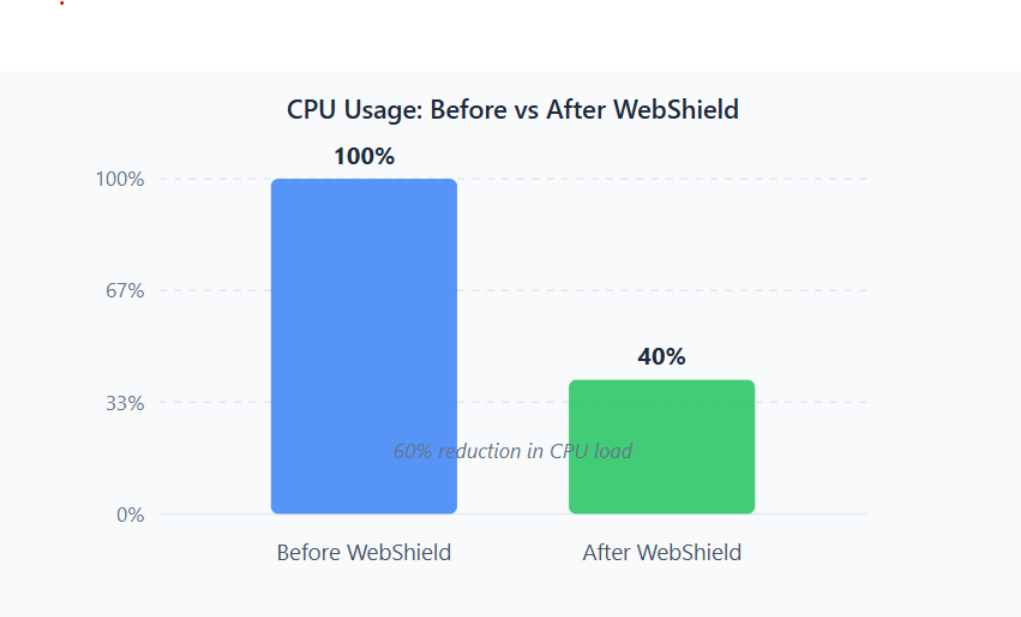
- In a published case study, WebShield blocked 1.5 million bot requests in a single month and reduced CPU usage by 60% on one high-traffic blog server (Imunify Security, Foxtrot Media case study).
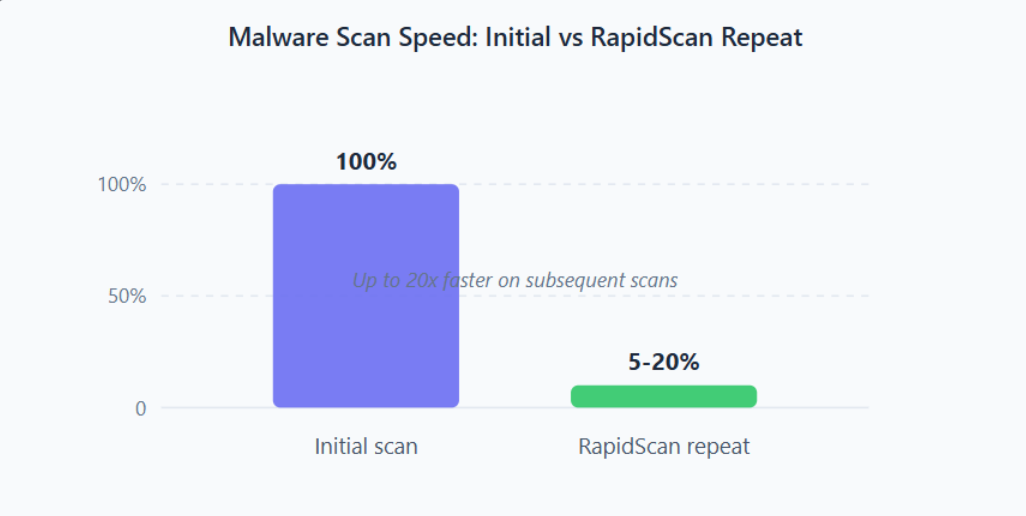
- RapidScan makes repeated malware scans up to 20 times faster than the initial scan, reducing the ongoing performance overhead of continuous file-level protection (Imunify Security, official documentation).
- Proactive Defence blocks PHP-based attacks even when there is no known malware signature, which is the capability that separates Imunify360 from signature-only scanners.
What Is Imunify360?
Imunify360 is a Linux server security platform built specifically for web hosting environments. According to Imunify Security's product documentation, it pools threat intelligence from more than 57 million domains across its global customer network (Imunify Security, product page, 2025). That means when one server in that network encounters a new attack source, the block propagates to other servers automatically, including yours.
It works with Apache, LiteSpeed, and Nginx. It integrates with cPanel, Plesk, DirectAdmin, and other hosting control panels. And it isn't a tool you configure once and forget: it updates its own threat data continuously based on attacks observed across that global network.
The six core layers are: network firewall with threat intelligence, WebShield and bot protection, web application firewall (WAF), malware scanner and clean-up, Proactive Defence for PHP runtime behaviour, and intrusion detection and prevention. The sections below cover each one in depth.
How Does the Network Firewall and Threat Intelligence Work?
The network firewall is the outermost layer. Across its global network of more than 57 million monitored domains, Imunify Security shares block data in near real time, which means your server benefits from attacks observed elsewhere, not only attacks it has personally encountered (Imunify Security, product page, 2025).
This is a meaningful difference from a manually maintained IP blocklist. When a new attack campaign targets one hosting server, the source IPs get reported to Imunify's cloud and pushed out to all connected servers within minutes. Your server does not need to be hit first to know the attacker is coming.
The firewall also includes IP whitelist, greylist, and blacklist controls; country-level blocking; port restrictions; and support for importing external IP lists. Admins can scope all of these per hosting account or apply them server-wide.
What to expect from it: Fewer brute-force and scanning attempts reaching your web application, lower baseline noise in server logs, and less attack traffic consuming bandwidth and CPU. The benefit is most visible on shared hosting servers where many accounts are exposed to the same pool of inbound abuse, and where blocking at the outer layer prevents that load from rippling through to every hosted site.
What Does WebShield and Bot Protection Actually Do?
WebShield sits in front of your web server as a reverse-proxy layer. It filters bot traffic, scraping attempts, and malicious requests before they reach Apache, LiteSpeed, or Nginx. The filtering protects server resources and removes a large volume of requests that would otherwise waste CPU cycles processing attacks that will never succeed anyway.
The system uses a lightweight JavaScript challenge to distinguish real human visitors from automated bots. If a visitor's IP is greylisted, they receive the challenge page. A real browser handles it automatically and passes through. A bot cannot complete it, so it is blocked. Your legitimate visitors do not see a CAPTCHA.
In 2024, a hosting provider using WebShield found that it blocked 1.5 million bot requests in a single month. On one high-traffic client blog where bot traffic had been generating persistent server load, CPU utilisation dropped by 60% after WebShield began filtering (Imunify Security, Foxtrot Media case study). That kind of reduction is significant when multiple sites share the same server.
The Enhanced DoS protection layer works alongside WebShield. Standard DoS protection counts simultaneous TCP connections per IP. Enhanced DoS counts request rate over time with per-port thresholds, catching burst floods that slip past connection-count limits. Together they cover both slow-connection attacks (such as Slowloris) and fast request-rate floods, on separate control planes so neither disables the other.
What to expect from it: Reduced login abuse events reaching your application, less CPU and bandwidth waste from scraping bots, and better server stability under load spikes generated by coordinated bot traffic.
What Does the Web Application Firewall Protect Against?
The WAF inspects the content of HTTP requests before they reach your web application. It blocks SQL injection attempts, cross-site scripting (XSS), path traversal, illegal resource access, and exploit patterns targeting known CMS vulnerabilities.
Imunify360 uses a ModSecurity-based WAF with Imunify Security's own proprietary rule set, updated and managed by their team rather than requiring manual rule maintenance on your part. For customers running WordPress, Joomla, Drupal, or Magento, this matters because CMS sites attract a constant stream of automated exploit attempts. The WAF acts as virtual patching: even if your CMS plugin has a known vulnerability that hasn't been updated yet, the matching WAF rule can block the exploit attempt before it succeeds.
On Apache 2.4 servers, a CMS auto-configuration mode rebuilds per-domain ModSecurity rules daily based on what software it detects running on each domain. According to Imunify Security's WAF documentation, this is designed to reduce false positives and make rules more effective for the actual application rather than applying a generic ruleset that may not match the site's real behaviour (Imunify Security, WAF documentation, 2025).
What to expect from it: Fewer compromises from known exploit patterns, virtual patch coverage for sites running outdated CMS plugins, and lower false-positive blocking rates on mainstream CMS platforms when CMS auto-configuration is active.

How Does Imunify360 Find and Remove Malware?
The malware scanner runs in three modes: real-time (triggered when files are created or modified on the server), scheduled (daily, weekly, or monthly full sweeps), and on-demand (run manually via the dashboard or CLI). It covers PHP files, uploads, CMS databases, and cron jobs.
After the first full scan, RapidScan changes how subsequent scans work. Rather than re-scanning every file, it uses local metadata and cloud-assisted hash checks to skip files that haven't changed since the last scan. Only modified or new files get a full re-check. In 2025, Imunify Security's official documentation states this makes repeat scans up to 20 times faster than the initial full scan (Imunify Security, RapidScan documentation, 2025).
CloudAV extends detection coverage by uploading suspicious files to Imunify's cloud infrastructure for deeper analysis, offloading the processing away from your server CPU. The result is broader detection without proportionally higher local CPU cost.
When malware is detected, Imunify360 attempts automatic clean-up, removing malicious code while preserving the rest of the file. If a clean backup copy exists, it restores from that first. The dashboard shows a full diff of every cleaned file so you can see exactly what was changed and why.
The Malware Database Scanner extends this to CMS databases, supporting WordPress, Joomla, and Magento 2. Database injections are one of the most common reinfection vectors after a site is cleaned at the file level. Scanning both layers together closes that path.
What to expect from it: Faster detection when a site is compromised, automated clean-up that reduces the manual time needed to restore a site to a clean state, and lower reinfection rates when database scanning and cron-job scanning are both enabled alongside file-level protection.
What Is Proactive Defence and Why Does It Matter for PHP Sites?
Proactive Defence is Imunify360's PHP runtime monitor. Instead of scanning files for known malware signatures after they've been written to disk, it watches what PHP code actually does while it runs. If a script attempts to do something that matches a malicious behaviour pattern (writing unexpected files, executing remote commands, accessing areas outside its normal scope), Proactive Defence can log the event or terminate the script immediately.
So what does runtime monitoring change in practice? Signature scanning is reactive by nature. An attacker can obfuscate malware so it carries no recognisable signature, and a file scanner will not catch it until a new signature is published. Proactive Defence doesn't rely on signatures: it watches behaviour at execution time, which means previously unseen or obfuscated PHP payloads can still be caught and stopped.
PHP Immunity builds on this. When Proactive Defence identifies an exploit path, PHP Immunity auto-generates a rule to block the same path from being used again. Blamer, the companion tool, traces how the malware got onto the server in the first place, which helps close the original entry point rather than just cleaning the symptom.
According to Imunify Security's product documentation, Proactive Defence operates in three modes: Disabled, Log Only, and Kill (Imunify Security, Proactive Defence documentation, 2025). Log Only is the recommended starting mode for servers with heavily customised applications, because Kill mode can terminate unusual but legitimate PHP behaviour until the environment is tuned. Starting in Log Only and reviewing events before switching to Kill gives you a clear picture of what the feature will catch in your specific environment.
What to expect from it: Stronger protection against obfuscated or previously unknown PHP malware, and materially reduced reinfection rates when PHP Immunity rules are active. It carries the highest tuning requirement of any Imunify360 feature for custom PHP applications.
How Does Imunify360 Handle Brute-Force and Login Attacks?
The IDS/IPS layer monitors server logs and authentication events across all services, not just web logins. When it detects repeated failed login attempts on SSH, FTP, mail, or web panel logins, it can block the attacking IP at the network level, either temporarily or permanently, depending on configured thresholds.
OSSEC Active Response refines this by targeting the specific port under attack rather than applying a broad IP block. This matters in shared-IP scenarios (such as corporate office networks or university connections) where blocking the whole IP could cut off legitimate users who happen to share it with an attacker.
On cPanel servers, Imunify360 monitors Exim and Dovecot directly. This protects against credential stuffing attacks on email services, which are a common vector attackers use after a password list is compromised. SSH and FTP protection runs through PAM integration, so brute-force blocking extends below the web layer to the underlying system access layer.
What to expect from it: Fewer successful brute-force logins across all services, faster automatic response to active credential attacks, and less log noise from persistent authentication failures that were previously arriving unchecked.
Does Imunify360 Have a Performance Cost?
All security software has some performance cost. Imunify360 is designed to minimise that cost, particularly for servers running continuous scanning across many hosted accounts.
In 2025, Imunify Security's official documentation confirms three features that address this directly. RapidScan makes repeat scans up to 20 times faster than the initial scan. CloudAV offloads deep analysis to Imunify's cloud infrastructure rather than consuming local server CPU. And Low Resource Mode, intended for constrained VPS plans, reduces Imunify360's RAM footprint to approximately 100 MB (Imunify Security, feature documentation, 2025).
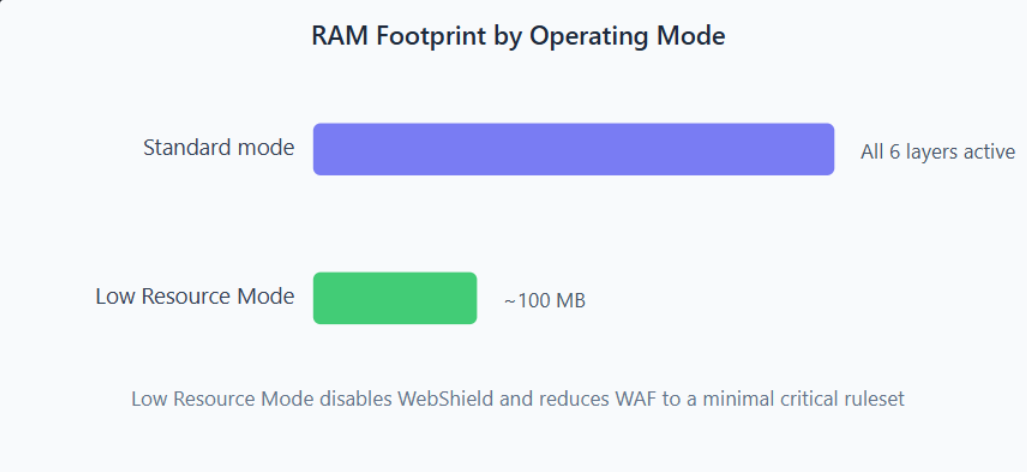
The trade-off in Low Resource Mode is worth understanding clearly. Turning off WebShield removes the bot filtering layer. If your server was previously offloading a large volume of bot traffic through WebShield, that traffic now reaches your web server directly and will consume CPU there instead. Low Resource Mode makes sense for servers under genuine RAM pressure where you need Imunify360's file scanning and WAF without the WebShield overhead. It isn't a net free win on overall resource usage.
What to expect from it: Moderate resource overhead in standard mode, with meaningful reductions available through RapidScan, CloudAV offloading, and Low Resource Mode if needed, each with a clearly defined trade-off.
Who Is Imunify360 Best For?
Imunify360 delivers the most value in environments with a high attack surface: many sites on one server, CMS platforms that aren't always kept fully up to date, or shared hosting where one compromised account could affect neighbouring accounts.
| Fits well | Does not fit well |
|---|---|
| Linux web hosting (cPanel, Plesk, DirectAdmin) | Windows servers |
| WordPress, Joomla, Drupal, Magento fleets | Kubernetes-first or fully containerised environments |
| Shared hosting with multiple tenant accounts | Deployments where a CDN-only edge WAF is preferred |
| PHP-heavy applications | Teams wanting a small standalone WAF component only |
| Agencies managing many client sites | Pure API security without an HTTP web layer |
It is not a cloud-edge proxy like Cloudflare. Large-scale volumetric DDoS traffic can still reach your server. Imunify360 works best as the deep server-side security layer behind an upstream CDN or edge service, complementing rather than replacing it.
Compare and customise Layershift managed hosting plans
Want to understand how Imunify360 is configured on your Layershift hosting account?
Ask our technical team and we can walk you through which features are active on your plan and what each is currently protecting against.
Frequently Asked Questions
Does Imunify360 protect against zero-day attacks?
Yes. Imunify360's Proactive Defence module analyses PHP script behaviour at runtime, so it can block malicious execution even when the malware is new or obfuscated with no known signature. This is the key difference between Imunify360 and a signature-only scanner. PHP Immunity then auto-generates rules to block the same exploit path from succeeding a second time, closing the route rather than just cleaning the symptom.
Will Imunify360 slow down my website?
For most websites the performance impact is neutral to positive. After the first full scan, RapidScan makes repeat scans up to 20 times faster than the initial scan (Imunify Security, official documentation, 2025). CloudAV offloads deeper analysis to Imunify's cloud rather than consuming local server CPU. On very small VPS plans, Low Resource Mode reduces the RAM footprint to approximately 100 MB, though WebShield is disabled in that mode.
What happens when Imunify360 finds malware on my server?
Imunify360 attempts to clean the infected file automatically, removing the malicious code while preserving the rest of the file where possible. It retains the original temporarily so you can compare before and after, restore from a clean backup if one is available, or revert if needed. The full scan history and a file diff showing exactly what changed are both accessible in the hosting control panel dashboard.
Does Imunify360 protect WordPress sites?
Yes, across multiple layers. The WAF applies CMS-specific rules for WordPress, the Malware Database Scanner checks the WordPress database for injected content, and Proactive Defence blocks malicious PHP behaviour at runtime. The optional Imunify Security WordPress plugin lets admins view malware status and protection events directly inside wp-admin, which is useful for customers who manage their own site without regular access to the server control panel.
What is the difference between Imunify360 and a basic firewall?
A basic firewall blocks traffic at the network level by IP, port, or protocol. Imunify360 adds five more protection layers on top of that: a managed web application firewall inspecting HTTP request content, WebShield for bot and request-flood filtering, real-time malware scanning and automated clean-up, PHP runtime exploit blocking via Proactive Defence, and intrusion detection across logs, login events, and email services. It is a coordinated platform, not a single tool.
What Imunify360 Gives You in Practice
Imunify360 is a meaningful step forward from relying on a basic firewall and hoping your CMS stays patched. Its three strongest differentiators are Proactive Defence for PHP zero-day attack blocking, WebShield for bot and request-flood filtering, and the combined malware scanner plus database scanner for post-compromise clean-up and reinfection prevention.
The clearest measured outcomes come from WebShield: a 60% reduction in CPU load and 1.5 million bot requests blocked in a single month on one hosting server (Imunify Security, Foxtrot Media case study, 2024). Those specific numbers will vary with your traffic profile, but the direction is consistent across multiple published case studies. Servers carrying high inbound bot volume see the biggest gains from WebShield. Servers with lower traffic still benefit materially from the WAF and Proactive Defence layers, even when the headline resource numbers are smaller.
If you have Imunify360 on your Layershift hosting account, all six layers are running for your sites. If you have questions about how it is configured, what a specific event in your dashboard means, or whether your current plan includes a particular feature, get in touch with our support team.
Sources
- Imunify Security, product overview page, retrieved 2026-06-19, https://www.imunify360.com/
- Imunify Security, WAF and ModSecurity documentation, retrieved 2026-06-19, https://docs.imunify360.com/
- Imunify Security, Proactive Defence and PHP Immunity documentation, retrieved 2026-06-19, https://docs.imunify360.com/
- Imunify Security, RapidScan and CloudAV feature documentation, retrieved 2026-06-19, https://docs.imunify360.com/
- Imunify Security, Low Resource Mode documentation, retrieved 2026-06-19, https://docs.imunify360.com/
- Imunify Security, Foxtrot Media case study, retrieved 2026-06-19, https://www.imunify360.com/success-stories/
- Imunify Security, WordPress plugin documentation, retrieved 2026-06-19, https://docs.imunify360.com/