
Deciding which AI bots to allow used to be one checkbox. It is now twenty-two named user agents across a dozen operators, several of which do the opposite of what their name suggests, and two of which never touch your server at all.
If you want the strategic argument about whether to block AI crawlers in the first place, we covered it here in a LinkedIn post 👉 should you block AI crawlers. This blog post assumes you have made that call to manage bot access. You are now looking for specifics: which named bot does what, and what happens when you switch it off.
Blocking "AI Training" on Cloudflare Also Blocks Googlebot
Cloudflare's own words, from its announcement on 1 July 2026: "Multi-purpose crawlers such as Googlebot, Applebot, and BingBot will be blocked by customers who have selected to block Training" (Cloudflare, July 2026).
So you went into the dashboard to stop AI companies training on your content. On the way out, you took Googlebot with you.
The mechanism is mundane. Cloudflare classifies bots by what they may do, and a bot can carry more than one behaviour. Googlebot crawls for Search, and its output can feed AI features, so it sits in both buckets. A rule aimed at one behaviour catches every crawler holding that behaviour.
You will not get an alert when this happens. You will notice it in Search Console, weeks later, which is the worst possible way to find out.
There is a date attached, too. Cloudflare is changing its defaults on 15 September 2026: sites joining after that point will have Training and Agent switched off by default wherever they show ads, and Search left on (Cloudflare). Check the scope before you panic. It reaches new domains only, and only their ad-bearing pages. Existing Cloudflare customers keep whatever they have already got.
Cloudflare Has Eleven Bot Behaviours, Not Three
Nearly every write-up of this topic, including the first draft of this one, says Cloudflare sorts AI traffic into three types. That is wrong, and the error matters.
Cloudflare's behaviour taxonomy runs to eleven: Search, Agent, Training, Transact, Data Collection, Security Testing, SEO, Ads Verification, Social / Link Preview, Feed Fetching, and Monitoring & Operations. The post announcing the change lists all eleven in a table and says directly that it classifies "plenty of other behaviors beyond the three above", including "ads verification, feed fetching, and agentic transactions" (Cloudflare, July 2026).
Search, Agent and Training are simply the three exposed as managed presets. That is worth holding onto, because it tells you the presets are a convenience layer rather than the underlying truth. When a preset produces a result you did not expect, like Training taking Googlebot with it, the explanation is usually in the layer underneath.
For the record, Cloudflare's older category list, the one with AI Crawler and AI Search as separate entries, is now legacy. Cloudflare's documentation states that under the new taxonomy "there is no longer a meaningful distinction between 'AI Search' and traditional search" (Cloudflare). If you set rules against the old categories, they are worth revisiting.
The Search Bots: Allow These
Search crawlers are what make you findable in AI answers. Blocking them is the decision most likely to cost you something you actually wanted, and the operators are unusually direct about the consequences.
| Bot | Operator | What blocking it costs you |
|---|---|---|
OAI-SearchBot |
OpenAI | You "will not be shown in ChatGPT search answers", though you can still appear as navigational links |
Claude-SearchBot |
Anthropic | It "may reduce your site's visibility and accuracy in user search results" |
PerplexityBot |
Perplexity | You stop being surfaced and linked in Perplexity's results |
DuckAssistBot |
DuckDuckGo | You leave DuckDuckGo's AI answers, but opting out "does not impact organic search rankings" |
MistralAI-Index |
Mistral | You leave Mistral's index. It is "not used for generative AI training of any kind" |
Googlebot |
Your entire organic search presence. Do not do this | |
Applebot |
Apple | Spotlight, Siri and Safari stop surfacing you |
bingbot |
Microsoft | Bing search, and the search layer underneath Copilot |
Sources: OpenAI, Anthropic, Perplexity, DuckDuckGo, Mistral, Google, Apple. Retrieved 15 July 2026.
Note the last three rows. Googlebot, Applebot and bingbot are the multi-purpose crawlers from the section above: the ones a Training block catches by accident.
The Training Bots and Control Tokens: Your Block Candidates
Training crawlers are the easiest class to block by name, because blocking a named training bot costs you no Google, Bing or ChatGPT visibility. Two rows below are exceptions worth knowing about: Meta-ExternalAgent also indexes, and Amazonbot also feeds Amazon's product answers. Neither is a pure training crawler.
Blocking Training as a Cloudflare preset is a different action again, with a different blast radius, as the Googlebot trap above shows. Same word, two mechanisms.
This is also where the naming gets genuinely confusing.
| Bot or token | Operator | Behaviour | Appears in your logs?
| Bot or token | Operator | Behaviour | Appears in your logs? |
|---|---|---|---|
GPTBot |
OpenAI | Trains foundation models | Yes |
ClaudeBot |
Anthropic | Collects content that "could potentially contribute to their training" | Yes |
Meta-ExternalAgent |
Meta | Training "or improving products by indexing content directly" | Yes |
Amazonbot |
Amazon | Improves products, "may be used to train Amazon AI models" | Yes |
Bytespider |
ByteDance | Undocumented. See below | Yes |
CCBot |
Common Crawl | Open crawl repository, not an AI operator | Yes |
Google-Extended |
Training opt-out control | No | |
Applebot-Extended |
Apple | Training opt-out control | No |
Bing NOARCHIVE / NOCACHE |
Microsoft | Training and Copilot control | No |
That last column is the one nobody tells you about. Google-Extended, Applebot-Extended and Bing's meta tags are control tokens, not crawlers. They never issue a request. Apple says it plainly: "Applebot-Extended does not crawl webpages" (Apple). They only tell the operator how it may use data its real crawler already collected.
Which sets an easy trap. Add Disallow: Google-Extended, grep your access logs to confirm it worked, find nothing, and conclude the block failed. The block is fine. The token was never going to appear. A control token cannot be verified from your logs at all, and that is the one thing your logs will never tell you.
Three more things worth knowing about this table.
Microsoft has no AI training user agent. Its entire control surface is meta tags, not robots.txt tokens. NOARCHIVE excludes you from Copilot answers and training; NOCACHE allows Copilot to use your URL, title and snippet only. Microsoft says content with either tag "will still appear in our search results" (Microsoft). If you blocked AI training via robots.txt alone, you did nothing about Microsoft.
ByteDance publishes no documentation for Bytespider. No stated purpose, no robots.txt commitment, no blocking guidance. We looked. Its reputation for ignoring robots.txt is attested only by third parties, so we are not going to state it as fact, but you should know you are dealing with an undocumented crawler and judge it accordingly.
CCBot is the back door, and this is our read rather than Common Crawl's. Common Crawl describes CCBot as infrastructure for an open, publicly analysable repository (Common Crawl), and never presents itself as a route into model training. But that repository is public and free to download. Block GPTBot and ClaudeBot while allowing CCBot and you have locked the front door of a building with an open loading bay. Whether that matters depends on why you are blocking: it is fatal to a content-protection goal and irrelevant to a bandwidth one.
The Agent Fetchers: Decide These Per Section
Agent traffic sits between discovery and extraction. A human asked for this page, right now, which makes it the hardest class to have a blanket opinion about.
| Bot | Operator | What it is |
|---|---|---|
ChatGPT-User |
OpenAI | Visits when a ChatGPT user or Custom GPT asks for the page |
Claude-User |
Anthropic | Fetches when someone asks Claude a question |
Perplexity-User |
Perplexity | Fetches at a Perplexity user's request |
Meta-ExternalFetcher |
Meta | "Fetches individual links at a user's request" |
MistralAI-User |
Mistral | User-triggered, and "not used for crawling the web in any automatic fashion" |
Google-CloudVertexBot |
Crawls at your own request when you build a Vertex AI agent |
That last row is a trap in the other direction. Google-CloudVertexBot crawls sites at the site owner's request for their own Vertex AI Agent builds (Google). Blocking Google-Extended protects you from Google. Blocking Google-CloudVertexBot mostly breaks something you asked for.
Do AI Agents Actually Respect robots.txt?
Frequently not, and the operators are refreshingly honest about it. OpenAI says that because ChatGPT-User actions are initiated by a user, "robots.txt rules may not apply" (OpenAI). Perplexity says Perplexity-User "generally ignores robots.txt rules" since a user requested the fetch (Perplexity). Meta says the same of Meta-ExternalFetcher.
That is not a loophole they are hiding. It is written in the manual.
The reasoning is that an agent fetch is closer to a person clicking a link than to a crawler indexing the web, and robots.txt was never meant to govern what a human asks for. Whether you accept that is a separate question. Either way, plan around it rather than against it.
Which leads to the honest position: robots.txt is a request, and it always was. Google's documentation describes robots rules as instructions that respectable crawlers may follow, not as enforcement. If you need agent traffic actually stopped rather than politely asked, that is a WAF rule or a rate limit. A text file that asks nicely is not an access control.
What Does Each Operator Give Back?
Wildly different amounts, and the gap is the strongest argument for per-operator rules. Cloudflare measured crawl-to-referral ratios in July 2025 and found Anthropic crawling 38,065 pages for every visitor it referred, against OpenAI at 1,091, Perplexity at 195 and Microsoft at 41 (Cloudflare, August 2025).
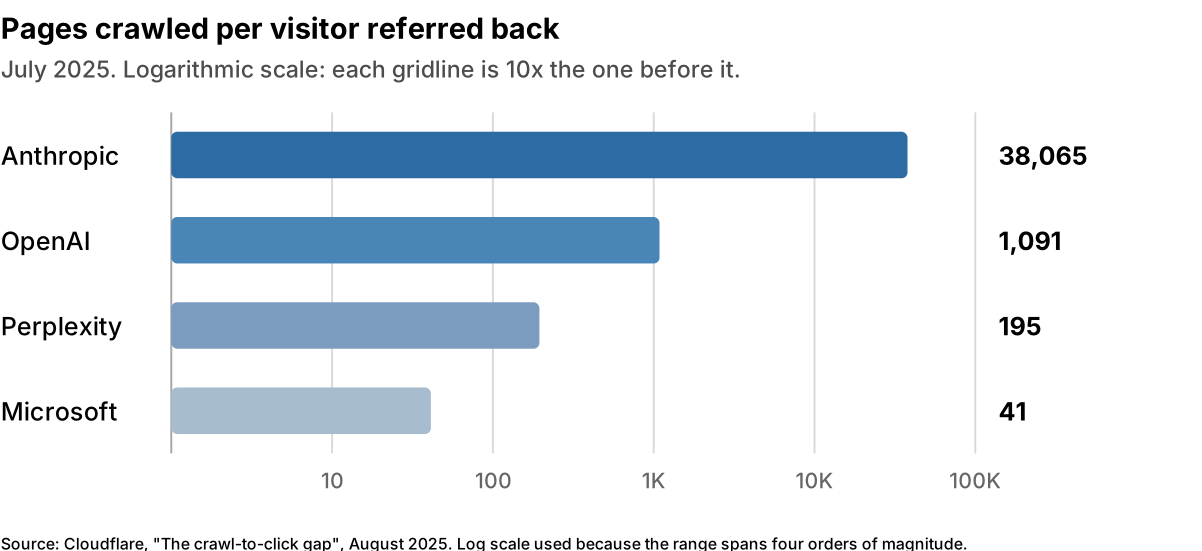
Two honest caveats, because this chart gets waved around a lot.
These are ratios, not verdicts. A ratio tells you what a crawler took and what it sent back. It does not tell you what that traffic was worth, and one qualified buyer from Perplexity can outweigh a lot of wasted bandwidth. Ratios also move fast: Cloudflare's own figures for these operators differ by month, so treat any single number as a snapshot rather than a constant.
One caveat Cloudflare puts on its own numbers, which most people quoting them leave out: traffic referred by Claude's native app does not send a Referer header, so Cloudflare says the calculations "may overstate the respective ratios, but it is unclear by how much". The pattern is solid. The precise multiple is not.
The volume behind it is real enough, though. Cloudflare reported that 52% of crawler requests were for AI training as of June 2026, up from 22% in spring 2025 (Cloudflare, July 2026).
What AI Crawlers Actually Do to a Web Server
They cost you far more than their share of your traffic suggests. When the Wikimedia Foundation analysed its own infrastructure, it found bots were roughly 35% of pageviews but "at least 65% of this resource-consuming traffic" (Wikimedia, April 2025).
That gap is the whole story, and it is worth understanding properly, because it explains why "just block them" and "just ignore them" are both wrong.
Not every request costs the same
A cached page is close to free. It is served from memory by the web server, never touches PHP, and never opens a database connection. Ten thousand of those are a rounding error.
A cache miss is a different animal entirely. It occupies an application worker for the full duration of the request, holds a database connection while it works, and returns maybe 200ms to 900ms later on a typical WordPress install.
Same bot. Same site. Two orders of magnitude apart in what they cost you.
So the question is never "how many requests did the crawler make". It is "how many of them missed cache". A crawler that walks your cached article archive is a guest. A crawler that walks everything else is a problem.
Crawlers are unusually good at finding the expensive routes
Not deliberately. They follow links, and your site links to more URLs than you think.
Take WooCommerce layered navigation. Its widget builds a filter_{attribute} and query_type_{attribute} parameter pair for every filterable attribute, read straight from $_GET and comma-joined for multi-select (WooCommerce source). Six attributes with ten values each is not sixty URLs. It is a combinatorial space in the millions, every one of them linked, every one of them crawlable.
Here is the part that gets misdescribed constantly, including in the first draft of this post: on a Varnish-fronted stack, those query strings do not bypass your cache. Varnish's built-in VCL passes on only three conditions, none of which is a query string: a non-GET/HEAD method, an Authorization header, or a Cookie header. The cache hash is built from req.url and the host (Varnish builtin.vcl).
Which is worse, not better. Every unique parameter combination does not skip the cache; it mints a brand new cache object. The crawler is not evading your cache, it is filling it with millions of single-use entries, and each one is a cold miss that reaches your origin exactly once and is never requested again.
Know which failure mode you have, because they are not the same. Plenty of stacks do the opposite: WP Rocket and most hand-rolled nginx WordPress configs bypass the cache entirely on unknown query args, and LiteSpeed's exclusions are opt-in rather than default (LiteSpeed). Under bypass you trade cache churn for a guaranteed origin hit on every single request. One poisons the cache for your humans; the other skips it and goes straight for your workers. Both bills arrive.
The second-order effect: your cache stops working for humans
This is the part that surprises people, and it is not our theory. Cloudflare studied it with ETH Zurich and published the result: "Pages once considered 'long-tail' or rarely accessed are now being frequently requested", and "as a result of their broad, unpredictable access patterns with long-tail reuse, AI crawlers significantly raise the cache miss rate". Their conclusion is blunt: "The drop in hit rate implies that LRU is struggling under the repeated scan behavior of AI crawlers", and this "churns the cache that the human traffic relies on" (Cloudflare).
Read that last phrase again, because it is the one that matters. Your cache is finite. Every cold object a crawler drags into it evicts something a human was going to ask for. The damage is not the crawler's own requests. It is that your real visitors start missing cache too, and they do it after the crawl has finished.
Wikimedia found the same thing from a completely different architecture: crawler bots "bulk read" less-visited content, so "these types of requests are more likely to get forwarded to the core datacenter, which makes it much more expensive". Two operators, different stacks, same finding.
Then the queue maths does the rest
PHP-FPM runs a fixed pool of workers. The manual is unambiguous about what pm.max_children means: "This option sets the limit on the number of simultaneous requests that will be served" (PHP manual).
One worker, one request, for the whole request. So a pool of eight workers means eight concurrent uncached requests, and the ninth waits. PHP even ships a metric for exactly this, listen queue, defined as "the number of requests (backlog) currently waiting for a free process", alongside max children reached (PHP manual).
When a crawler opens ten concurrent connections against uncached routes, it takes the pool. The requests behind it queue. Some of those requests are customers.
What this looks like in practice: the support ticket never says "a crawler is saturating our worker pool." It says the site felt slow on Tuesday afternoon. Once the listen queue backs up far enough that the web server cannot hand off the connection at all, the visitor stops getting a slow page and starts getting a gateway error instead. That last step is our own operational read rather than something PHP or nginx document, but it is where these incidents usually end up.
It is not theoretical, and the bills are public
SourceHut spent 168 hours and 30 minutes in a single disruption it attributed to LLM crawlers, and said so on its own status page: "SourceHut continues to face disruptions due to aggressive LLM crawlers" (SourceHut status, March 2025). That is a week of downtime at an infrastructure company.
Read the Docs published the invoice. Crawlers pulled "73 TB of zipped HTML files in May 2024, with almost 10 TB in a single day", costing "over $5,000 in bandwidth charges". After blocking, "bandwidth for our downloaded files has decreased by 75%" (Read the Docs, July 2024).
But look at their own diagnosis of why it hurt so much: "There was no bandwidth limiting in place, or support for Etags and Last-Modified headers which would have allowed the crawler to only download files that had changed." That is not an AI problem. That is 1990s HTTP hygiene, and it went unnoticed for years because no previous client was rude enough to expose it. Most sites that get hurt by AI crawlers are not being attacked. They are being audited.
Why crawl-delay will not save you, and who actually honours it
Now the bit that inverts most people's assumptions.
Google does not support crawl-delay at all. Its robots.txt spec lists the supported fields and states plainly that "other fields such as crawl-delay aren't supported", and that "rules other than allow, disallow, and user-agent are ignored by the robots.txt parser" (Google). Apple says Applebot does not follow it either (Apple). Google also retired the Search Console crawl rate limiter in January 2024; its remaining advice is to return 500, 503 or 429, with the warning that doing so beyond a day or two means "the URL may be dropped from Google's index" (Google).
Anthropic, on the other hand, states: "We support the non-standard Crawl-delay extension to robots.txt", and says it aims for "minimal disruption by being thoughtful about how quickly we crawl the same domains and respecting Crawl-delay where appropriate" (Anthropic). Note "where appropriate" is Anthropic's hedge, not ours.
So the operator with the heaviest crawl-to-referral ratio in Cloudflare's data is also the one that documents a throttle you can actually use. The operator you least want to block ignores throttling, retired the dashboard that used to help, and leaves you serving deliberate errors instead. Politeness and load are not correlated the way people assume, which is why "who is the worst offender" is a less useful question than "which lever does this specific operator give me". OpenAI, for what it is worth, documents no crawl-rate control in either direction, so do not assume GPTBot honours a delay you set.
Bing does support crawl-delay, on a scale from 1 (slow) to 10 (extremely slow) (Bing).
What actually works
In rough order of how much good it does:
- Cache the routes they hammer. This converts the expensive requests into free ones and helps your humans at the same time. It is the only fix on this list with no downside.
- Send
ETagandLast-Modified, and honour conditional requests. A well-behaved crawler will then stop re-downloading things that have not changed. Read the Docs identified this as its own root cause. - Rate limit at the edge, not the origin. A limit enforced by your own PHP pool has already cost you the worker you were trying to protect.
- Constrain the URL space. Stop linking every facet combination, or exclude the parameter space from crawling. Google publishes dedicated guidance on faceted navigation for exactly this reason.
- Set
crawl-delayfor the operators that honour it, knowing Google and Apple will ignore it and OpenAI has not said. - Block, last. It is the bluntest tool, it does the least for your cache hit ratio, and as the hub post covers, it often does not work anyway.
Notice that four of those six are things you should have been doing before anyone trained a language model. Robots.txt exists, in Google's own words, to "avoid overloading your site with requests" (Google). That was true in 1994. AI crawlers did not create this problem. They found it.
How Do You See Which Bots Are Hitting Your Site?
Before you set a single rule, answer the boring question: what is arriving right now? Most site owners genuinely cannot say, and a policy built on assumption is a guess with extra steps.
On Cloudflare, AI Crawl Control is the starting point, and it is available on all plans (Cloudflare). Four views matter:
- Overview gives request volume, status codes, popular paths and activity grouped by operator, so OpenAI, Google, Anthropic, ByteDance and Meta show up separately.
- Crawlers lists each bot by name and operator with request count, data transfer and its current Allow or Block action. This is where you find the bot burning bandwidth on 2019 blog posts.
- Metrics breaks activity down over time by status code, content format and referral data.
- Directives shows how crawlers interact with your robots.txt, including which ones violate it. That last column is the useful one.
Know the plan limits before you build a process around features you do not have. Referral data needs a paid plan. Bot Analytics is Business and Enterprise, with the fuller version requiring Enterprise plus the Bot Management add-on (Cloudflare). BotBase, the searchable directory of verified bots and their classifications, is Enterprise with Bot Management only (Cloudflare).
Not on Cloudflare? The method does not change, only the tooling. Sort your access logs by user agent and find the paths taking a beating. Then read whatever bot rules your CDN or WAF is already enforcing, which on most sites is a short archaeology exercise.
One step people skip: verify the bot is the bot. A user agent string is self-declared, so impersonating GPTBot costs an attacker nothing, and scrapers do it precisely because allowlists exist. OpenAI, Anthropic and Perplexity all publish IP ranges to check against. Verify before you allowlist, or the allowlist becomes the hole.
Then close the loop on the other side. Google Search Console now reports impressions for AI Overviews and AI Mode by page, country and device (Google). Bot-side data tells you what arrived. Search-side data tells you whether your decisions cost you anything.
Setting Rules Without Breaking Search
Three habits keep you out of the traps above, whatever policy you land on.
Set rules per crawler, not per brand. "I don't want Anthropic on my site" is not a policy, it is a mood. ClaudeBot and Claude-SearchBot are different bots with opposite consequences, and one rule aimed at the company hits both.
Re-read rules you set before 2025. The advice that "blocking ClaudeBot has no referral cost" was defensible when Anthropic ran one crawler. It now runs Claude-SearchBot separately and says disabling it may reduce your visibility in user search results. Rules written against a one-bot world are quietly wrong now.
Verify at the operator, not the aggregator. Nearly every claim in this post is sourced to the operator's own documentation, and where it is not, we have said so in the text. We also dropped several widely-repeated figures while writing this, including a crawl-to-referral pair quoted confidently across dozens of SEO posts that appears in no Cloudflare source we could find. If a number about a crawler matters to your decision, find it on the operator's domain or do not use it.
None of that tells you what to allow. It tells you that whatever you allow, you will have allowed it on purpose, and you will be able to prove what happened afterwards. That is a lower bar than most sites currently clear.
A Starting robots.txt You Can Copy
This is the "allow Search, block Training, leave Agent alone" policy written out. It is a starting point rather than a recommendation for your specific site, and it only governs the crawlers that choose to honour it.
# Allow search crawlers: these make you findable in AI answers

User-agent: OAI-SearchBot

User-agent: Claude-SearchBot

User-agent: PerplexityBot

User-agent: DuckAssistBot

User-agent: MistralAI-Index

Allow: /

# Block training crawlers: both of these are operator-documented as

# feeding model training, with no search behaviour attached.

User-agent: GPTBot

User-agent: ClaudeBot

Disallow: /

# Dual-purpose. Read the table above before you paste these.

# Meta says Meta-ExternalAgent trains models "or improves products by

# indexing content directly", and Amazonbot feeds Amazon product answers.

# Blocking them is a real trade, not a free one. Your call.

User-agent: Meta-ExternalAgent

User-agent: Amazonbot

Disallow: /

# Bytespider is undocumented. ByteDance states no purpose for it, so this

# is a judgement call about an unknown crawler, not a training block.

User-agent: Bytespider

Disallow: /

# CCBot is NOT a training crawler. It feeds a public archive that anyone,

# including model builders, can download. Include it only if your goal is

# content protection. Leave it out if your goal is bandwidth.

User-agent: CCBot

Disallow: /

# Training control tokens. These never appear in your logs.

User-agent: Google-Extended

Disallow: /

User-agent: Applebot-Extended

Disallow: /

# Googlebot, Applebot and bingbot are deliberately absent.

# Leave them alone unless you know exactly why you are touching them.
Three things this file cannot do. It will not stop the agent fetchers, because ChatGPT-User, Perplexity-User and Meta-ExternalFetcher tell you plainly that they may ignore it. It does nothing about Microsoft, whose controls are the NOARCHIVE and NOCACHE meta tags rather than a robots token. And if you are on Cloudflare, its dashboard settings sit in front of this file, so check both.
Where Hosting Comes Into It
Everything above assumes you can see your own traffic. Most of these decisions fail at that first step rather than at the policy step.
Per-crawler rules also need somewhere sensible to live. robots.txt handles the crawlers that ask permission; the ones that do not are a job for a CDN with a WAF, where you can rate-limit an agent fetcher without touching your origin. And when a crawler does start costing you real capacity, the fix is usually caching the paths it hammers rather than banning it, which is a managed VPS question rather than a robots.txt one.
If you would like a second pair of eyes on what is arriving at your server, talk to us.
Frequently Asked Questions
Should I block GPTBot?
Usually yes, if your only goal is protecting content. OpenAI says GPTBot crawls content that may be used in training its foundation models, so blocking it costs you no search visibility. GPTBot is separate from OAI-SearchBot, the crawler that makes you eligible for ChatGPT search answers. Block one, not the other.
What is the difference between GPTBot and OAI-SearchBot?
GPTBot collects training data for OpenAI's foundation models. OAI-SearchBot indexes your site for ChatGPT search. OpenAI states that sites opted out of OAI-SearchBot "will not be shown in ChatGPT search answers, though can still appear as navigational links". Blocking GPTBot carries no equivalent visibility penalty.
Does blocking Google-Extended hurt my Google rankings?
No. Google states Google-Extended "does not impact a site's inclusion in Google Search nor is it used as a ranking signal in Google Search". It controls whether your content trains future Gemini models. Blocking Googlebot is a serious SEO decision. Blocking Google-Extended is not the same thing.
What is the difference between ClaudeBot and Claude-SearchBot?
ClaudeBot collects web content that could contribute to model training. Claude-SearchBot indexes your site to improve search result quality. Anthropic warns that disabling Claude-SearchBot "may reduce your site's visibility and accuracy in user search results". The older advice that blocking ClaudeBot has no referral cost is now out of date.
Should I allow PerplexityBot on my website?
Allow it if you want to appear in Perplexity's results. Perplexity's documentation says PerplexityBot "is designed to surface and link websites in search results on Perplexity". It is a search crawler, not a training crawler. Perplexity-User is the separate agent fetcher, and Perplexity says it generally ignores robots.txt.
Do AI agents respect robots.txt?
Often not, and the vendors say so openly. OpenAI states that because ChatGPT-User actions are user-initiated, "robots.txt rules may not apply". Perplexity says Perplexity-User "generally ignores robots.txt rules". If you need agent traffic stopped rather than asked politely, that is a firewall or WAF rule, not a text file.
How do I see which AI bots are crawling my site?
On Cloudflare, AI Crawl Control is available on all plans and shows each crawler's name, operator, request count, data transfer and current Allow or Block action. Referral data needs a paid plan. Without Cloudflare, sort your server access logs by user agent, then verify claimed bots against the operator's published IP ranges.
Which crawlers get blocked when I block AI training on Cloudflare?
More than you intend. Cloudflare states that "multi-purpose crawlers such as Googlebot, Applebot, and BingBot will be blocked by customers who have selected to block Training". Those three carry both Search and Training behaviour, so one preset catches all of them. Per-crawler rules avoid this; a single global toggle does not.
Why does Google-Extended never appear in my server logs?
Because it is not a crawler. Google-Extended and Applebot-Extended are control tokens that never issue a request. Apple states plainly that "Applebot-Extended does not crawl webpages". They tell the operator how to use data its real crawler already took, so their absence from your logs is expected, not evidence a block failed.
Sources
All sources retrieved 15 July 2026.
- Cloudflare, "Your site, your rules: new AI traffic options for all customers", 1 July 2026, https://blog.cloudflare.com/content-independence-day-ai-options/
- Cloudflare, "Content Independence Day, one year on", 1 July 2026, https://blog.cloudflare.com/agentic-internet-bot-report/
- Cloudflare, "The crawl-to-click gap", 29 August 2025, https://blog.cloudflare.com/crawlers-click-ai-bots-training/
- Cloudflare, "The crawl before the fall of referrals" (crawl-to-refer methodology and Referer caveat), 1 July 2025, https://blog.cloudflare.com/ai-search-crawl-refer-ratio-on-radar/
- Cloudflare and ETH Zurich, "Rethinking cache for AI and humans" (AI crawlers raise cache miss rates, LRU under scan behaviour), https://blog.cloudflare.com/rethinking-cache-ai-humans/
- Wikimedia Foundation, "How crawlers impact the operations of the Wikimedia projects", 1 April 2025, https://diff.wikimedia.org/2025/04/01/how-crawlers-impact-the-operations-of-the-wikimedia-projects/
- SourceHut, "LLM crawlers continue to DDoS SourceHut" (168h 30m downtime), 17 March 2025, https://status.sr.ht/issues/2025-03-17-git.sr.ht-llms/
- Read the Docs, "AI crawlers need to be more respectful" (73 TB, $5,000, Etag diagnosis), 25 July 2024, https://about.readthedocs.com/blog/2024/07/ai-crawlers-abuse/
- PHP manual, FPM configuration (pm.max_children), https://www.php.net/manual/en/install.fpm.configuration.php
- PHP manual, FPM status page (listen queue, max children reached), https://www.php.net/manual/en/fpm.status.php
- Varnish Cache, built-in VCL, https://varnish-cache.org/docs/7.4/users-guide/vcl-built-in-code.html
- WooCommerce, layered nav widget source, https://github.com/woocommerce/woocommerce/blob/trunk/plugins/woocommerce/includes/widgets/class-wc-widget-layered-nav.php
- Google, robots.txt specification (crawl-delay not supported), https://developers.google.com/search/docs/crawling-indexing/robots/robots_txt
- Google, "Introduction to robots.txt" (avoid overloading your site with requests), https://developers.google.com/search/docs/crawling-indexing/robots/intro
- Google, "Reduce Google crawl rate", https://developers.google.com/crawling/docs/crawlers-fetchers/reduce-crawl-rate
- Google, "Faceted navigation", https://developers.google.com/crawling/docs/faceted-navigation
- Bing, "Crawl delay and the Bing crawler, MSNBot", https://blogs.bing.com/webmaster/August-2009/Crawl-delay-and-the-Bing-crawler,-MSNBot
- Cloudflare, "Verified bot categories", https://developers.cloudflare.com/bots/concepts/bot/verified-bots/categories/
- Cloudflare, "AI Crawl Control: Analyze AI traffic", https://developers.cloudflare.com/ai-crawl-control/features/analyze-ai-traffic/
- Cloudflare, "Bot Analytics for Business and Enterprise", https://developers.cloudflare.com/bots/bot-analytics/biz-and-ent/
- Cloudflare, "BotBase", https://developers.cloudflare.com/bots/botbase/
- OpenAI, "Bots and crawlers", https://developers.openai.com/api/docs/bots
- Anthropic, "Does Anthropic crawl data from the web?", https://support.claude.com/en/articles/8896518-does-anthropic-crawl-data-from-the-web-and-how-can-site-owners-block-the-crawler
- Perplexity, "PerplexityBot", https://docs.perplexity.ai/guides/bots
- Google, "Google common crawlers", https://developers.google.com/search/docs/crawling-indexing/google-common-crawlers
- Google, "Generative AI performance report", https://support.google.com/webmasters/answer/16984139?hl=en
- Apple, "About Applebot", https://support.apple.com/en-us/119829
- Microsoft, "Announcing new options for webmasters to control usage of their content in Bing Chat", https://blogs.bing.com/webmaster/september-2023/Announcing-new-options-for-webmasters-to-control-usage-of-their-content-in-Bing-Chat
- Meta, "Meta web crawlers", https://developers.facebook.com/docs/sharing/webmasters/web-crawlers/
- Amazon, "Amazonbot", https://developer.amazon.com/amazonbot
- DuckDuckGo, "DuckAssistBot", https://duckduckgo.com/duckduckgo-help-pages/results/duckassistbot/
- Mistral, "Mistral AI crawlers", https://docs.mistral.ai/robots
- Common Crawl, "CCBot", https://commoncrawl.org/ccbot